Preview Filled with sample values. Click to enlarge.
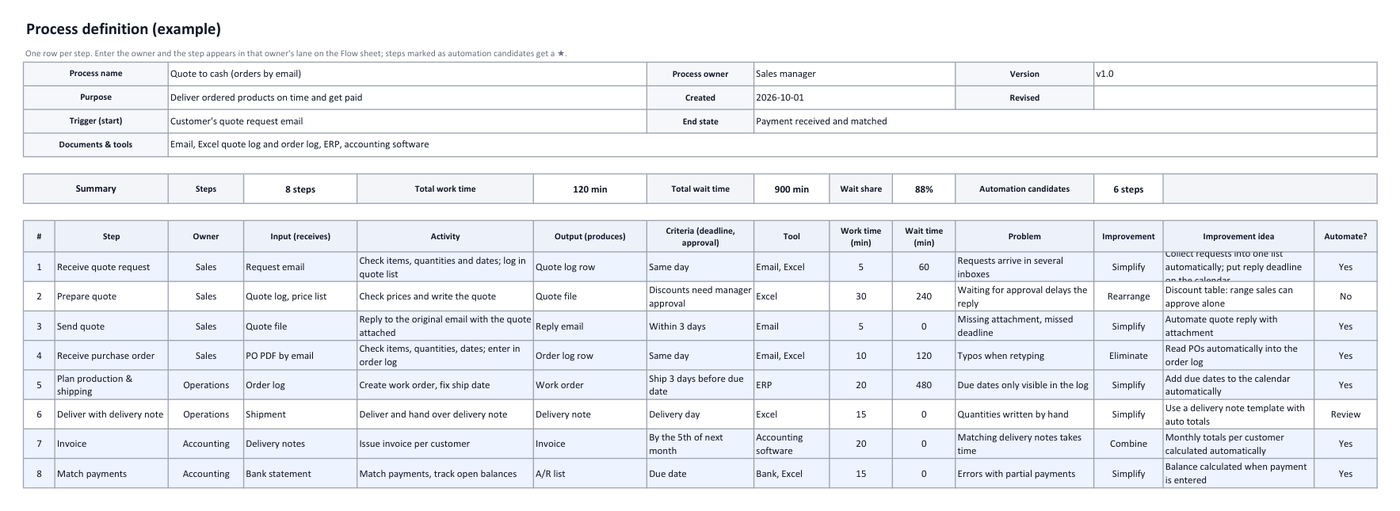
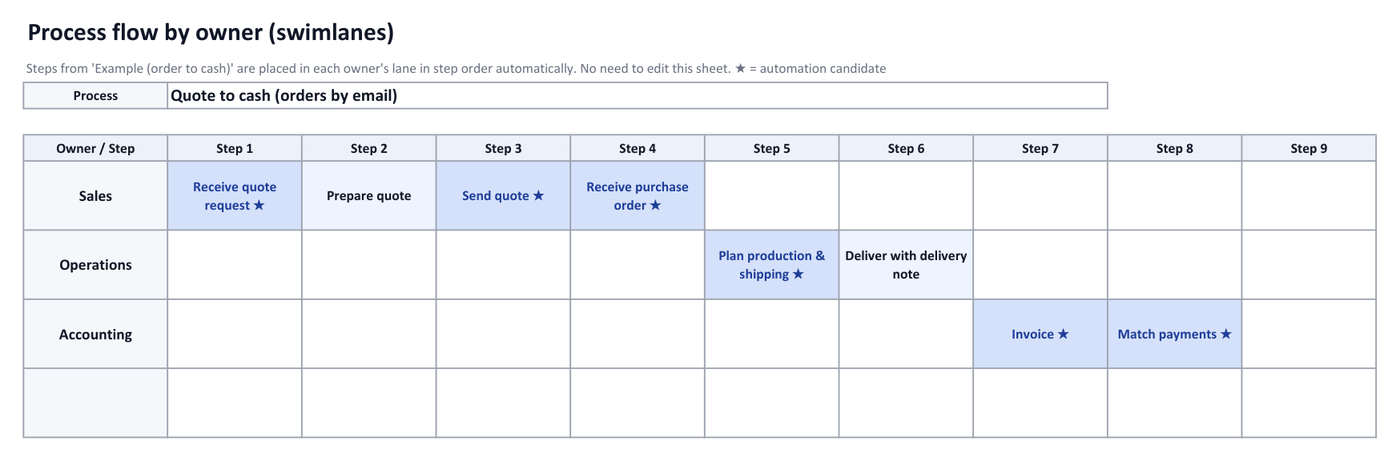
A process definition describes a piece of work step by step: who receives what, does what and produces what. In this template you write one row per step; the Flow sheet then creates one lane per owner and places the steps in order, so you get a swimlane chart without drawing anything.
What's in the template
| Sheet | Contents |
|---|---|
| Process definition | Name, purpose, trigger, end state, and per step: owner, input, activity, output, criteria, tool, times and improvement (20 steps) |
| Flow | Steps placed in owner lanes in order automatically; ★ marks automation candidates |
| Example (order to cash) | Eight steps from a quote request by email to matching the payment |
| Flow example | The flow drawn from the example |
| How to use | Order of work and how to choose an improvement (eliminate, combine, rearrange, simplify) |
How do I write a process definition?
- Set the scopeEnter the process name, purpose, trigger and end state first.
- One row per stepName each step with a verb and an object, like "Prepare quote", then fill in owner, input, activity, output, criteria and tool.
- Add timesEnter work time and wait time in minutes. The summary shows totals and the share of waiting; a high share usually means room to improve.
- Check the flowThe Flow sheet builds up to 8 owner lanes. Handoffs between lanes are where work tends to wait.
- Choose improvementsFor each problem pick eliminate, combine, rearrange, simplify or keep, describe the idea and mark automation candidates.
How to choose an improvement
- Eliminate: Would the result be the same without this step?
- Combine: Can it be merged with another step or done by the same person?
- Rearrange: Would changing the order or owner reduce waiting?
- Simplify: Can it be made easier, standardized or automated?
Steps that copy email into spreadsheets
In many order-to-cash processes, several steps are about reading an email and typing it into a list. Those are usually the first automation candidates. AiutoForm reads quotes, orders, delivery notes and invoices from email with AI and logs them in Excel or Google Sheets.
See it in the demo.
Frequently asked questions
Do I need a special Excel version?
No. The flow chart uses ordinary formulas, so it works in older Excel versions and in Google Sheets.
What if I have more than 8 owners?
The Flow sheet draws 8 lanes. The check row under the chart tells you when a step's owner has no lane; group owners into teams or split the process.
Can I use this template for my business?
Yes. It is free to download, change and use.
Will it work with your inbox?
Tell us which email service and document formats you use, and we will show you how it fits.